GOOGLE PAY FOR SENIORS
Context
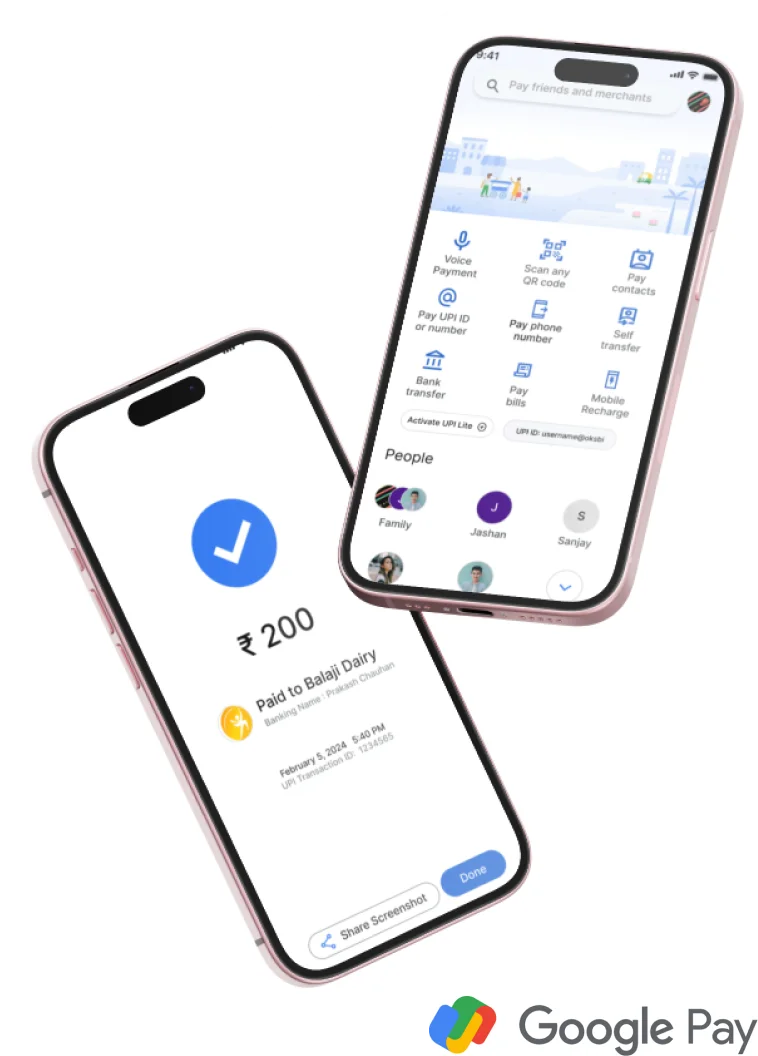
The idea of this hypothetical project came to my mind when I saw my grandfather ask my brother to make a UPI payment that he seemed to be struggling with. So I imagined a Google Pay, but designed specifically for seniors who don’t necessarily speak English. This app could bridge the language barrier, simplify interfaces, and prioritize core financial tasks. The benefits? Empowerment, inclusion, and a potentially untapped market.
Time Frame
6 weeks
Role
Sole Designer
Involvement
UX Design, User Research, Empathy, Ideation, User Interface Design, Usability Testing
CHALLENGES
GooglePay offers convenience and security, but it's true that some older adults might find it challenging to use. Here are some potential reasons:
Technological barriers:
- Unfamiliarity with smartphones
- Vision and dexterity issues
- Security concerns
- Linguistic Barriers
Personal preferences:
- Privacy concerns
- Habit and comfort
UX RESEARCH
SECONDARY RESEARCH
- “Seniors and Digital Payments: Adoption, Usage, and Challenges” by AARP (2022)
- •Financial Inclusion of the Elderly Population in India“ by Reserve Bank of India(2020):
- •“Digital Divide and Financial Inclusion: A Study of Elderly Population in Rural India” by International Journal of Research in Social Science (2019)
- •“An Analysis of Unified Payments Interface (UPI) Transactions in India” by The Clearing Corporation of India Limited (2021):
- •Other reports by Digital Empowerment Foundation and NPCI
PRIMARY RESEARCH
I conducted User Interviews on a sample of 5 users ranging from the age of 48 to 76. These included 3 females and 2 males across various educational levels from High School Diploma to PhD. The following insights were gained:
KEY INSIGHTS
- Focus on accessibility of the design
- Simplification of the process
- Validate security concerns
- Inclusion of more Local Languages
Additionally, creating a different app for people of a certain age group may be stigmatizing and further the digital divide that we aim to bridge.
Therefore, creating design solutions that offer accessibility that is scalable to all users may be helpful to consider.
OTHER INSIGHTS
•Include in-app tutorials to help theusers (basedon the suggestion Digital Empowerment Foundation) •Considering integration with existingpension or social security schemes (based on suggestion from NCPI)
USER PERSONAS

Tech- Savvy Senior - Amir (Age 60) :
- - Background: Former engineer with a bachelor's degree.
- - Technology Experience: Comfortable with smart phones and basic apps, but struggles with small text and complex interactions.
- - Challenges: Visual impairment makes it hard to read small fonts and icons.
- - Needs: Larger text size options, high contrast mode, and voice navigation features.

Late Adopter - Mamta (Age 76) :
- - Background: Retired teacher with amaster's degree.
- - Technology Experience: Limited exposure tosmartphones and apps, recently started using them for basic tasks.
- - Challenges: Difficulty understandingEnglish prompts and navigating unfamiliar interfaces.
- - Needs: Step-by-step tutorials, intuitivedesign with minimal text, and support for voice commands in their nativelanguage.
Elderly Explorer - Kiran (Age 68) :
- - Background: Retired librarian with a highschool education.
- - Technology Experience: Limited experiencewith smartphones, primarily uses them for making calls and sending texts.
- - Challenges: Difficulty navigating complexinterfaces, especially in English.
- - Needs: Simplified navigation, clear visualcues, and language support in their native language.

Casual User - Mahinder (Age 55) :
- - Background: Small business owner with somecollege education.
- - Technology Experience: Uses a smartphonefor communication and occasional online shopping.
- - Challenges: Finds it overwhelming tonavigate through complex features and settings.
- - Needs: Streamlined user interface,prominent help features, and simplified payment processes.
IDEATION & DESIGN
HOW MIGHT WE:
PAPER WIREFRAMING:
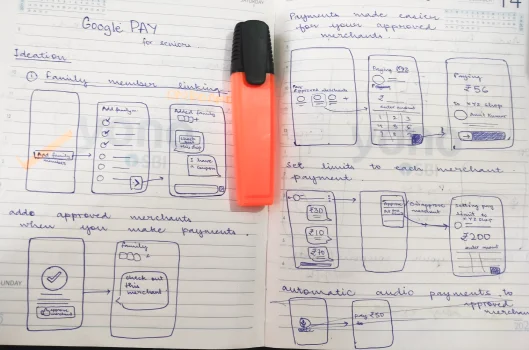
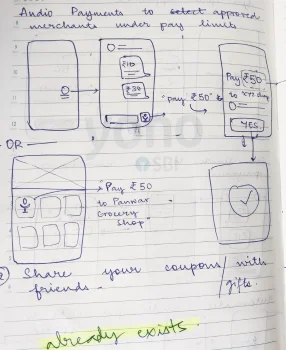
DIGITAL MOCKUPS ON FIGMA
Based on the gained insights, I came up with a few design solutions:
1. SECURITY CONCERNS
A major reason why seniors hesitate using online methods of payment is because they are concerned about getting their money deducted or sent to a wrong person simply because they made a wrong move while using the app.
SOLUTION
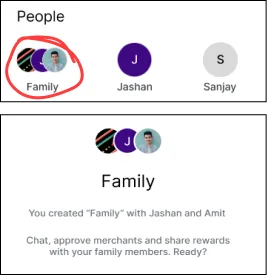
Creating a family setting where members of a family can pre- approve merchants like nearby shops for groceries that the family uses often. This would help the seniors gain confidence while making smooth payments.
2. SIMPLIFICATION OF PROCESS
We could make the payment method simpler by reducing number of steps for an ease of use.
SOLUTION
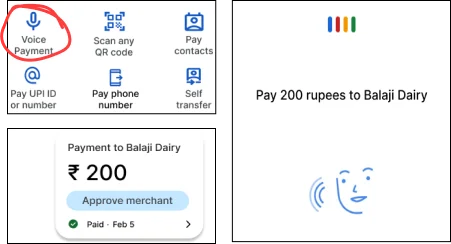
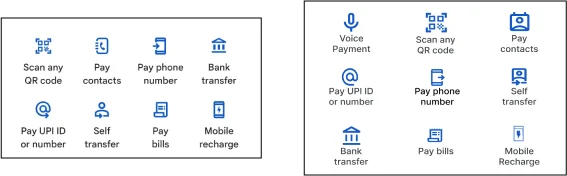
Voice Payment options for the approved merchants set in the family mode. A maximum limit can be set for voice payments for select merchants above which the transactions can be made like they normally are.
3. LINGUISTIC BARRIERS
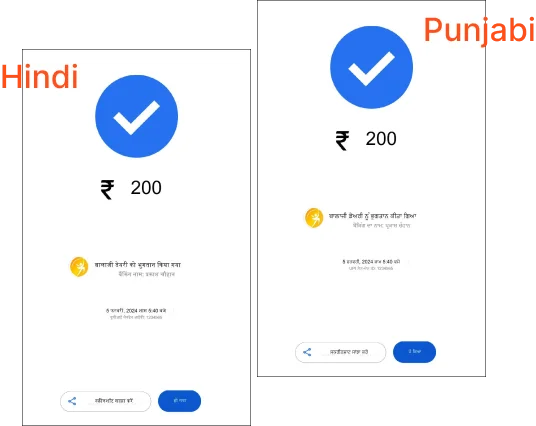
Different language options become crucial in a country like India where there are about 22 official languages and countless local dialects. Not every user is necessarily an English-speaker. Although Google Pay does offer Hindi, Hinglish, Bengali, Gujarati, Kannada, Malayalam, Marathi, Tamil and Telugu options which are a lot but these do not cover all official Indian Languages.
SOLUTION
For this particular project, I shall only use Hindi, Hinglish and Punjabi for my design models as these are the only Indian languages besides English that I know.
4. INCREASED SIZE OF ELEMENTS
A larger size of text and other UI elements is needed to cater to seniors as they may have issues with vision and may even struggle accidental tapping leading to confusing and bad user experiences. But since Google Pay already adjusts the size settings of the application according to the device’s font and size option, I kept it as is.
FINAL DESIGNS
VISUAL DESIGN SYSTEM
For this project, I stuck to the original design system of the Google Ecosystem. The resources used too were taken from Google’s Open Design System: Material Design.
https://m3.material.io/